@Christian John, I might be able to help. Curious, what is the goal of the calc fields on either side of the created date? Looks like you're using those to determine how many days have passed since the created on date? If you can tell me a bit more about the outcome you're after and the calc field script I can try and take a look.
yes that is correct the following days open is to calculate how many days are left open for the particular item, it will result 0 when it is completed however you see there in the image is the following Items are still open and a Day has been passed so it supposed to count as Zero so I tried the refresh Calculations but still count zero and the following Modify Template says 0
@Christian John if you have the calc script I can look at that. But, knowing there are usually different ways to arrive at the same outcome let's try this. I have a test app with a date field and a calc field. The calc field is built to determine how many dates have passed since the date field. One caveat, I do have a cheat in this version as different approaches kept returning 5 days in my example vs 4 (you'll see below the date is 11/22, today is 11/26, which means to me it's been 4 days. Maybe something like this will work?
Enjoyed reading the article above, really explains everything in detail, and the article is very interesting and effective. Thank you and good luck assurant t mobile with the upcoming articles. Great post. It was much needed. Love your simplistic style of explanation.
@Christian John I had another thought on this with a second approach. Depending on how you have your calc field, your items might not have any reference to the current date. Currently you have the date the item is created and the calc to determine how many days have passed, but the calc probably isn't taking into account the current date (since the calc field depends on other field changes to update it, and doesn't update dynamically with the date simply rolling over a day).
There are two ways to tackle this:
1) In the app you have here, add a hidden "today" field with a workflow that updates the date to the current date every day. With that "today" date field and the "created on" date field we can update the calc field to give us the time between those dates.
2) If there are many places in your Podio setup where you have these kinds of calculations, you should implement a "Central Timer" app. That app would have a single item with a date field which is updated to the current date, every day but a workflow. Then, for all apps that need to have this calculation you would add the central timer as a related item to each of those app items that are created and use the date field from the Central Timer app item as the "today" date.
This is actually easier done than said, let me know if you want to connect on a quick call and I can help you figure out the best way to go and get it set up.

@Christian John, I might be able to help. Curious, what is the goal of the calc fields on either side of the created date? Looks like you're using those to determine how many days have passed since the created on date? If you can tell me a bit more about the outcome you're after and the calc field script I can try and take a look.
yes that is correct the following days open is to calculate how many days are left open for the particular item, it will result 0 when it is completed however you see there in the image is the following Items are still open and a Day has been passed so it supposed to count as Zero so I tried the refresh Calculations but still count zero and the following Modify Template says 0
@Christian John if you have the calc script I can look at that. But, knowing there are usually different ways to arrive at the same outcome let's try this. I have a test app with a date field and a calc field. The calc field is built to determine how many dates have passed since the date field. One caveat, I do have a cheat in this version as different approaches kept returning 5 days in my example vs 4 (you'll see below the date is 11/22, today is 11/26, which means to me it's been 4 days. Maybe something like this will work?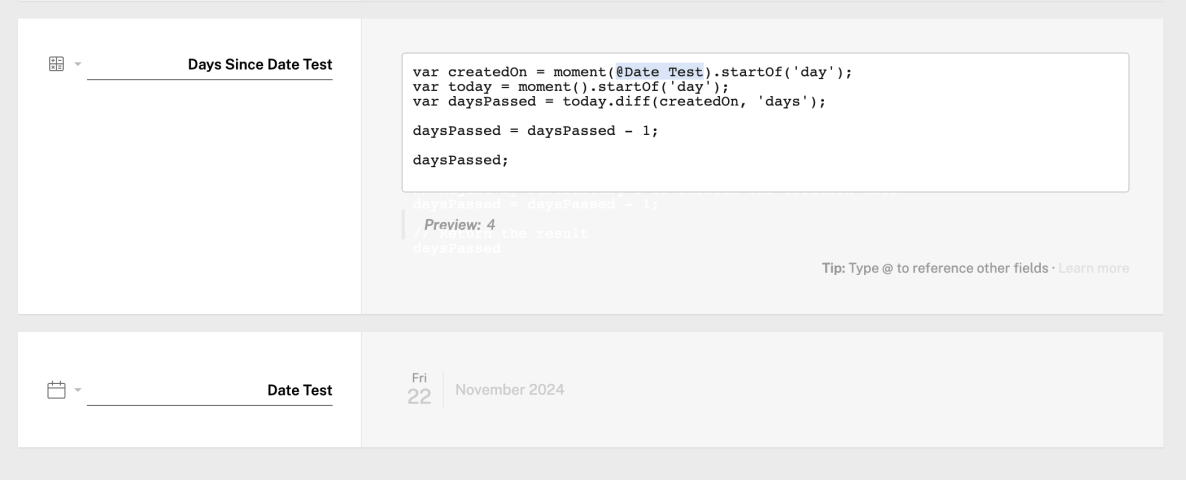
@Christian John, sorry meant to paste the calc script:
var createdOn = moment(@Date Test).startOf('day');
var today = moment().startOf('day');
var daysPassed = today.diff(createdOn, 'days');
daysPassed = daysPassed - 1;
daysPassed;
Enjoyed reading the article above, really explains everything in detail, and the article is very interesting and effective. Thank you and good luck assurant t mobile with the upcoming articles. Great post. It was much needed. Love your simplistic style of explanation.
@Christian John I had another thought on this with a second approach. Depending on how you have your calc field, your items might not have any reference to the current date. Currently you have the date the item is created and the calc to determine how many days have passed, but the calc probably isn't taking into account the current date (since the calc field depends on other field changes to update it, and doesn't update dynamically with the date simply rolling over a day).
There are two ways to tackle this:
1) In the app you have here, add a hidden "today" field with a workflow that updates the date to the current date every day. With that "today" date field and the "created on" date field we can update the calc field to give us the time between those dates.
2) If there are many places in your Podio setup where you have these kinds of calculations, you should implement a "Central Timer" app. That app would have a single item with a date field which is updated to the current date, every day but a workflow. Then, for all apps that need to have this calculation you would add the central timer as a related item to each of those app items that are created and use the date field from the Central Timer app item as the "today" date.
This is actually easier done than said, let me know if you want to connect on a quick call and I can help you figure out the best way to go and get it set up.