Leonora Gomez asked a question.
I am trying to add a field to the leads template that calculates a new date from an existing date field. The “Date Purchased” field has a value brought over from an automation in iSpeedtoLead. I want to add a calculation that takes Date Purchased + 21 day
@Leonora Gomez this depends on the type of field you want to output the new date into. Here are a coupe approaches...
1) If you have the Podio Premium Plan, and access to Podio Workflow Automation, you could build this as a workflow. When a new Lead is created you can build a workflow to calculate 21 days out from the "Date Purchased", and populate a Podio date field in your leads app (this way you can use that date field to report or trigger additional workflows down the road).
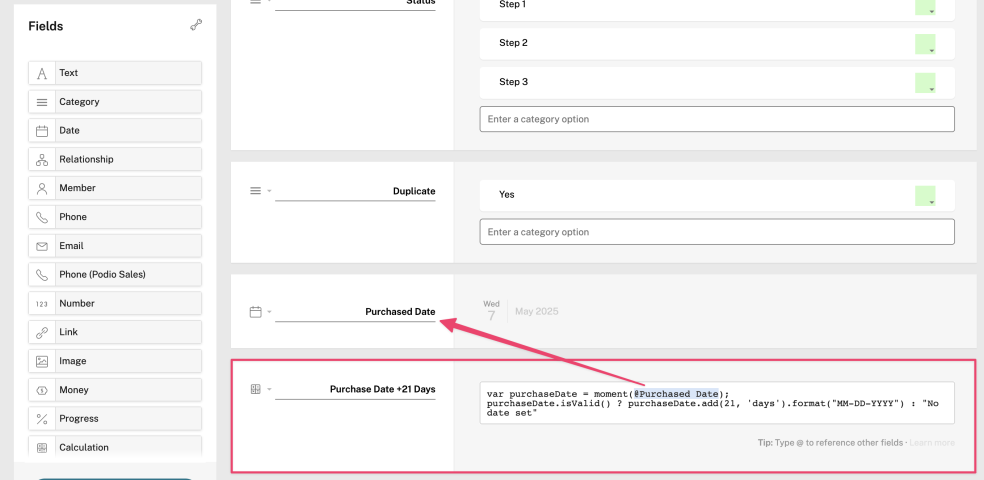
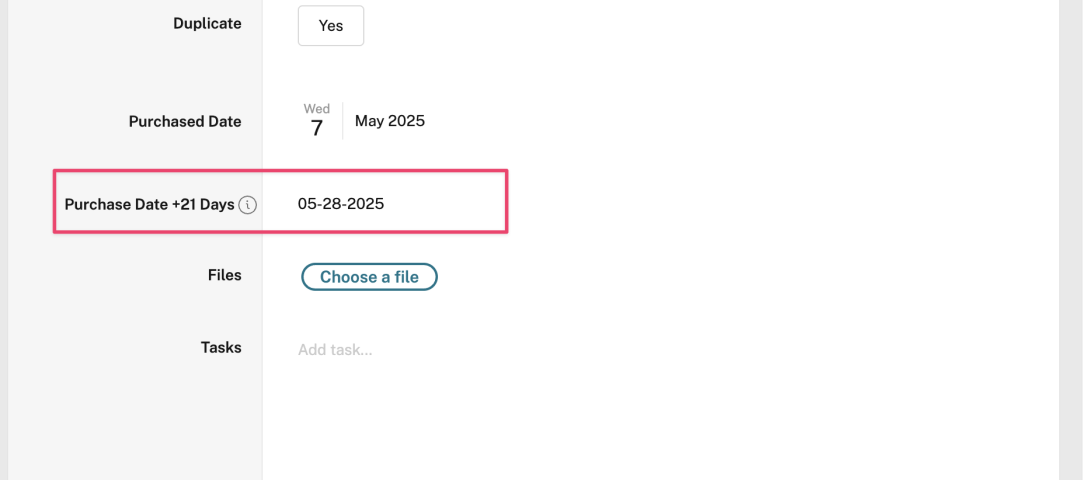
2) If you do not have the Premium Plan, you can still calculate the date 21 days out from the "Date Purchased" date, but it will return as a string value (not as a true date field). Below is a calculation script you can test to see how that would work (with screenshot of it working in a test app.
var purchaseDate = moment(@Date Purchased);
purchaseDate.isValid() ? purchaseDate.add(21, 'days').format("YYYY-MM-DD") : "No date set"